Effect 01
3D Perspective Tilt
3D 透视倾斜
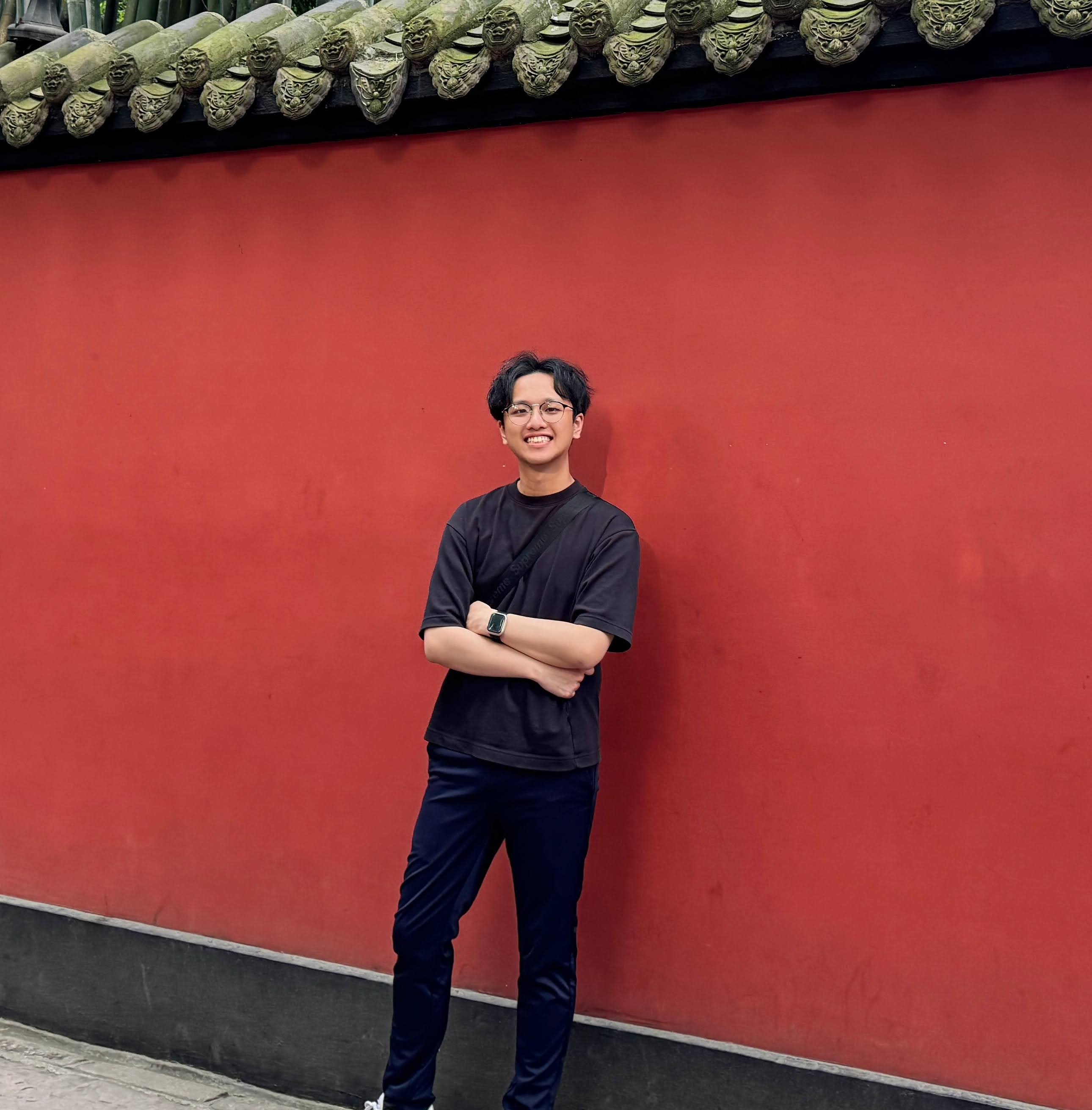
实现原理 · Principle 鼠标位置相对元素中心映射至
rotateX / rotateY 角度(±30°)。父元素设置 perspective: 800px 产生深度感。高光叠加层反向偏移模拟镜面反光,requestAnimationFrame 线性插值实现丝滑过渡。 Mouse offset from element center maps to rotateX / rotateY (±30°). CSS perspective: 800px creates depth. A highlight overlay shifts opposite to simulate specular reflection, smoothed via RAF lerp. Effect 02
RGB Glitch
RGB 故障艺术
实现原理 · Principle 三张叠加图像副本通过 SVG
feColorMatrix 分别隔离 R、G、B 通道,以 mix-blend-mode: screen 混合。悬停时,JS 每 60ms 随机偏移各通道 translateX 并用 clip-path 切割扫描线区域,产生撕裂故障效果。 Three image copies isolated to R, G, B via SVG feColorMatrix with mix-blend-mode: screen. On hover, a JS interval randomises translateX and clip-path slices every 60ms creating glitch tears. Effect 03
Particle Burst
粒子爆炸
实现原理 · Principle 点击时,图像通过
drawImage() 绘制到离屏画布,getImageData() 采样点击坐标的像素颜色。生成 80 个粒子携带采样色彩以随机速度向外扩散,在重力与透明度衰减下消散。纯 Canvas 2D,零依赖。 On click, getImageData() samples the pixel color at the click point. 80 particles spawn with that color and random velocity vectors, decaying under gravity. Pure Canvas 2D, no libraries. Effect 04
Liquid Distortion
液态扭曲
实现原理 · Principle SVG
feTurbulence → feDisplacementMap 滤镜链作用于图像。鼠标与元素中心的距离实时控制 baseFrequency(波纹密度)和位移 scale(扭曲强度)。每帧递增 seed,使湍流持续流动,产生生动的液态形变效果。 SVG feTurbulence → feDisplacementMap applied to the image. Mouse distance controls baseFrequency and displacement scale live. The seed increments each frame for a continuously flowing, living distortion. Effect 05
Holographic Foil
全息镭射
实现原理 · Principle 鼠标在图像上的横纵坐标分别映射至 CSS
hue-rotate()(0–360°)和 brightness()。一个带 mix-blend-mode: color 的七色彩虹渐变叠加层跟随鼠标偏移 background-position,模拟全息卡片随视角变换颜色的光变效果。 Mouse X/Y across the image maps to CSS hue-rotate() (0–360°) and brightness(). A rainbow gradient overlay with mix-blend-mode: color shifts its background-position with the cursor, simulating the iridescent color-shift of a holographic trading card. Effect 06
CRT Glow
CRT 荧光管
● REC 实现原理 · Principle 三层叠加构建 CRT 效果:(1)
::before 伪元素用 repeating-linear-gradient 绘制扫描线;(2) ::after 径向渐变实现晕影;(3) CSS filter: brightness/contrast/saturate 作用于图像。@keyframes 以不规则间隔模拟磷光体余辉闪烁,点击切换开关。 Three layers build the CRT illusion: ::before scanlines via repeating-linear-gradient, ::after radial vignette, and CSS filter on the image. A @keyframes flicker animation drops opacity at irregular intervals to simulate phosphor persistence. Click to toggle. Effect 07
Magnifying Lens
放大镜效果
实现原理 · Principle Canvas 覆盖层在鼠标位置实时绘制圆形放大镜。
ctx.clip() 创建圆形裁剪区域,在其中以 2.5× 缩放绘制图像的局部区域。透明玻璃质感通过白色高光环与内部阴影叠加实现。Canvas 其余区域保持透明,原图正常显示于底层。 A canvas overlay draws a circular magnifying lens following the mouse. ctx.clip() creates the circular region where the image is drawn at 2.5× zoom. A glass-like highlight ring and inner shadow complete the illusion. The rest of the canvas stays transparent. Effect 08
ASCII Art
ASCII 字符画
实现原理 · Principle 悬停时,图像绘制到离屏画布并通过
getImageData() 采样每个格子的像素亮度,映射到 ASCII 字符集(空格→@,由稀到密)。每个字符以像素原色染色后渲染到前景 Canvas,形成彩色字符画效果,鼠标离开时淡出还原。 On hover, getImageData() samples pixel brightness per grid cell, mapped to an ASCII charset (space → @). Each character is colored with the sampled pixel color and rendered to a foreground canvas, creating colored ASCII art. Mouse leave fades it out. Effect 09
Mosaic Pixelate
像素马赛克
实现原理 · Principle 悬停时,Canvas 以递增的像素块尺寸重绘图像:先将图像缩小(关闭
imageSmoothingEnabled),再放大至原尺寸,产生马赛克效果,块尺寸随帧递增至 30px。离开时反向缩减至 1px,图像逐渐恢复清晰。纯 Canvas,无 CSS 滤镜。 On hover, canvas redraws the image with increasing block size — scaling down (with imageSmoothingEnabled: false) then back up creates pixelation. Block size grows to 30px on enter and shrinks back to 1px on leave. Pure Canvas, no CSS filters. Effect 10
Bubble Metaballs
融球光晕
实现原理 · Principle 6 个带随机色相的彩色光球在头像上方漂浮,一个跟随鼠标。每帧以径向渐变绘制各球,通过 CSS
mix-blend-mode: screen 与底图叠加,产生彩色发光效果。当两球距离小于半径之和时,用三次贝塞尔曲线在它们之间绘制"桥梁"圆弧,模拟有机融合的视觉效果。 6 colored glow orbs float above the profile — one tracks the mouse. Each orb is a radial gradient overlaid with mix-blend-mode: screen, tinting the photo with neon color. When two orbs overlap, a cubic Bézier bridge arc is drawn between them to simulate the organic merge of true metaballs. Effect 11
Glow Trail
发光轨迹
实现原理 · Principle 每次
mousemove 在鼠标坐标处生成 6 个粒子,色相随时间递增产生彩虹渐变,粒子以随机速度向外扩散并受轻微重力下坠。Canvas 每帧以极低透明度清除(不完全清空),保留前帧残影形成拖尾消散效果。所有粒子通过径向渐变绘制,透明度与尺寸逐帧衰减直至消失,在头像上方留下发光火焰轨迹。 Each mousemove over the image spawns 6 particles with an incrementing hue for rainbow cycling. The canvas is faded each frame with a semi-transparent clear (not fully erased) to leave ghost trails. Particles spread outward with slight gravity, drawn as radial-gradient glows whose alpha and size decay until they disappear — painting a fire trail over the photo. Effect 12
Perlin Flow Field
柏林流场
实现原理 · Principle 内联实现二维柏林噪声(置换表 + 梯度插值)。200 个粒子在头像表面随机分布,每帧通过查询
perlin(x×scale, y×scale + t) 获得当前位置的流场角度,以极低不透明度的彩色短线绘制运动轨迹。随着 t 缓慢递增,流场持续演化,粒子轨迹层叠形成烟雾般流动的彩色光纹,覆盖于头像之上。 2D Perlin noise is implemented inline (permutation table + gradient interpolation). 200 particles are distributed over the profile surface; each frame they query perlin(x×scale, y×scale+t) for a flow angle and draw a hairline stroke at near-zero opacity. As t slowly advances the field evolves, and accumulated strokes layer into smoke-like colored flow ribbons drifting across the photo. Effect 13
Magnetic Pull
磁力悬浮
实现原理 · Principle 整张卡片作为磁铁,鼠标进入后以弹簧物理追踪光标偏移(LERP 系数 0.09,最大位移 ±22px)。阴影随位移量动态扩展,产生悬浮立体感。鼠标离开后弹回原位,模拟磁力释放效果。 The whole card acts as a magnet — on hover it spring-follows the cursor offset (lerp 0.09, max ±22px). The drop shadow grows with displacement for a levitation feel. On leave, it springs back to rest, simulating magnetic release.
Effect 14
Spotlight Reveal
聚光灯照射
实现原理 · Principle Canvas 覆盖层以
fillRect 绘制深色遮罩,再通过 globalCompositeOperation: destination-out 在鼠标位置"打孔",露出底层图像。径向渐变柔化边缘,聚光半径弹性过渡模拟镜头光圈开合。鼠标离开后聚光收合,图像重归黑暗。 A canvas overlay fills a dark mask, then destination-out composite punches a soft hole at the cursor, revealing the image beneath. A radial gradient softens the edge; the radius spring-transitions like an aperture. Mouse leave closes the light. Effect 15
Glass Shatter
玻璃碎裂
实现原理 · Principle 8 个绝对定位 div 均以同一背景图显示完整头像,各自用独特的
clip-path: polygon() 剪出碎片形状。悬停时,CSS transition(cubic-bezier 弹性曲线)驱动每块向外位移并微旋,模拟玻璃破碎瞬间。纯 CSS,零 JS。 8 absolutely-positioned divs share the same background image; each is clipped by a unique clip-path: polygon(). On hover, CSS transition with a cubic-bezier spring drives each shard outward with a slight rotation — the instant a pane of glass shatters. Zero JavaScript. Effect 16
Thermal Vision
热成像仪
实现原理 · Principle 悬停时,
getImageData() 读取每像素亮度(0–255),映射至热成像调色板:暗部→紫蓝(冷区),中间调→绿色(温区),亮部→黄橙红(热区)。重映射像素写入 ImageData 后 putImageData() 呈现,形成红外热像仪视觉。 On hover, getImageData() reads each pixel's brightness (0–255) and maps it to a thermal palette: darks → purple/blue (cold), mids → green (warm), brights → yellow/orange/red (hot). Remapped pixels are written back via putImageData(), producing an infrared thermal camera look. Effect 17
Water Wave
水波扭曲
实现原理 · Principle Canvas 每帧逐扫描线绘制图像:每行 y 的水平偏移为
sin(y × freq + t) × amp,振幅由鼠标与中心的距离实时控制(最大 ±14px)。鼠标靠近时波浪增强,离开后振幅缓降至 0,产生流动的水面折射效果。 Canvas redraws the image scanline by scanline each frame: row y's horizontal offset is sin(y × freq + t) × amp, with amplitude driven live by mouse proximity (max ±14px). Approaching intensifies the wave; leaving decays it — a sinusoidal water-refraction illusion. Effect 18
Aurora Diffusion
极光弥散
实现原理 · Principle 鼠标移入后,在光标 X 坐标附近生成 6 根竖向极光光柱,色相随时间漂移(青绿→品红→紫)。每根以竖向渐变绘制并以
mix-blend-mode: screen 叠加于头像,柱体振幅随正弦波缓慢摆动,模拟极光在夜空中舞动的流光。 Mouse entry spawns 6 vertical aurora columns near the cursor X, with hues cycling over time (cyan→magenta→violet). Each column is a linear-gradient beam composited via mix-blend-mode: screen. Column positions oscillate sinusoidally, simulating the dancing curtains of a real aurora borealis. Effect 19
Soft Eraser
柔边橡皮擦
实现原理 · Principle 鼠标经过时,在 Canvas 上以径向渐变绘制深色圆形笔触覆盖头像,模拟橡皮擦擦除效果。每个笔触记录生成时间戳,经过停留期(600ms)后透明度随时间线性衰减至 0,图像在鼠标离去后自动复原。 As the cursor moves, soft dark circles are painted onto a canvas overlay, masking the photo below. Each brush stroke stores a timestamp; after a hold period (600ms) its alpha decays linearly to zero — the image heals itself wherever the cursor has left.
Effect 20
Frost Crystallize
冰霜结晶
实现原理 · Principle 鼠标经过时生成冰晶多边形覆盖头像:以鼠标坐标为中心绘制 6~8 边的随机多边形,填充浅蓝白色渐变模拟霜冻结晶,并沿边缘绘制细白线。每枚冰晶独立倒计时,离开后透明度缓慢消散,图像逐渐恢复原貌。 Mouse movement spawns icy crystal polygons over the photo — 6-to-8-sided shapes filled with a pale blue-white radial gradient and outlined with a thin white stroke. Each crystal has an independent fade timer; they dissolve after the cursor leaves, letting the photo re-emerge through the thaw.
Effect 21
Ink Splash
墨水飞溅
实现原理 · Principle 鼠标移动时,在轨迹处生成 3~5 个墨滴:主圆 + 若干随机飞溅卫星点,以纯黑色覆盖头像。墨滴先以弹性缓动扩张至最大半径(bloom 阶段),再进入衰减期逐渐缩小并淡出,模拟墨水在纸面扩散后蒸发的动态。 Each mousemove spawns 3-5 ink drops at the cursor: a main blob plus random satellite splashes, painted in deep black over the photo. Each drop blooms outward with elastic easing, then enters a shrink-and-fade phase — mimicking ink spreading on paper before evaporating and restoring the surface beneath.
Effect 22
Reveal Eraser
圆形揭示橡皮
实现原理 · Principle 头像默认完全可见。鼠标经过时,Canvas 以页面背景色(#0a0a0a)绘制柔边圆形笔触覆盖头像,模拟橡皮擦效果。每个笔触记录生成时间戳,停留 300ms 后透明度线性衰减至 0,头像在鼠标离去后自动复原。 The photo is fully visible at rest. As the cursor moves, soft circular spots in the page background color (#0a0a0a) are painted over the photo — an eraser covering the image. Each spot holds for 300ms then fades back to transparent over 1.2s, restoring the photo wherever the cursor has left.
Effect 23
Brush Reveal
笔触揭示
实现原理 · Principle 与 Effect 22 相同的消散原理,但将相邻鼠标坐标连成粗笔触线段(
lineCap: round,宽 70px)而非孤立圆点。拖动时形成流畅的画笔涂抹效果,覆盖范围更广;笔触在 ~2 秒内自动淡出,头像重现。 Same erase-and-heal technique as Effect 22, but consecutive mouse positions are connected as thick rounded line segments (lineCap: round, width 70px). Dragging produces smooth, broad brush strokes that cover the photo; strokes fade out automatically in ~2s, letting the image resurface. Effect 25
Before / After Slider
前后对比滑块
Photo 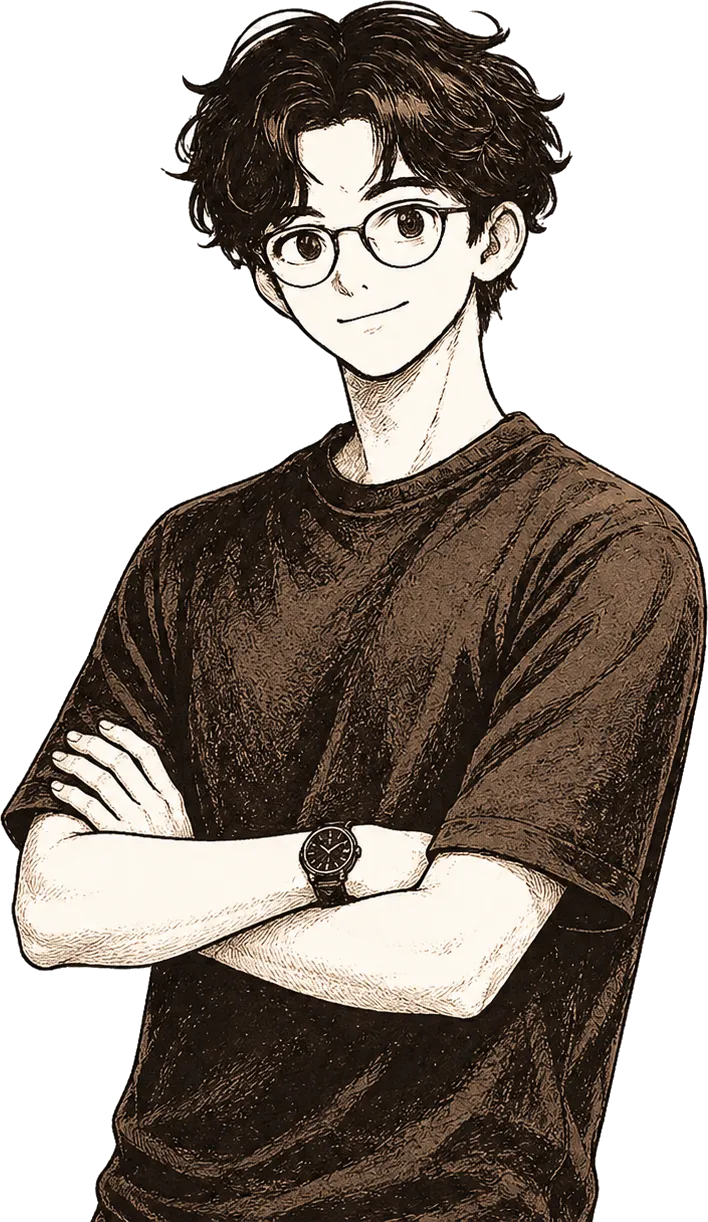
实现原理 · Principle 组件化的对比滑块(
BeforeAfter.astro):一个透明的全尺寸 <input type="range"> 同时充当拖拽面与键盘/读屏控件,其值写入 --ba-pos 自定义属性;前图用 clip-path: inset() 按该百分比裁剪,手柄线用同一变量定位 — 零指针数学。 Reusable comparison slider (BeforeAfter.astro): an invisible full-size <input type="range"> is both the drag surface and the keyboard/screen-reader control. Its value feeds the --ba-pos custom property; the before layer clips via clip-path: inset() and the handle tracks the same variable — no pointer math. Effect 24
Dust Scatter
尘埃散射揭示
实现原理 · Principle 每次
mousemove 在光标周围随机散射 12~16 个背景色小圆点(半径 5~18px,角度与距离均随机),形成颗粒状纹理遮盖效果。各尘点独立计时并随机延迟消散,产生沙粒般逐渐显现的动态感,头像在尘埃散去后复原。 Each mousemove scatters 12-16 small background-colored dots (radius 5-18px) at random angles and distances around the cursor, creating a grainy textured cover. Each dust particle has an independent fade timer with random delay — producing a sand-dispersal quality as the photo fades out and back in.